


Embedding parameters
This page covers how to pass parameter values to embedded dashboards and SQL questions in modular embeds, with either the web components or the React SDK.
If you’re embedding with an iframe instead, check out Parameters in iframe embeds.
Parameters differ between guest and SSO embeds
Depending on which authentication method you pick for an embed, the embedding wizard will offer different parameter options:
SSO embed parameters
With SSO authentication, you can set a default value and choose whether to hide a parameter’s widget. Your Metabase knows who’s viewing, so data permissions and row and column security filter the rows for you.
Guest embed parameters
With guest authentication, every parameter starts out Disabled, and for each parameter you can pick from:
- Disabled: no widget, and nobody can set a value.
- Editable: the widget shows, people can change the value, and your page can set a starting value.
- Locked: no widget. Your server sets the value in the signed token. Check out Restrict data on guest embeds.
You can’t disable a filter that always requires a value.
Restrict data on guest embeds
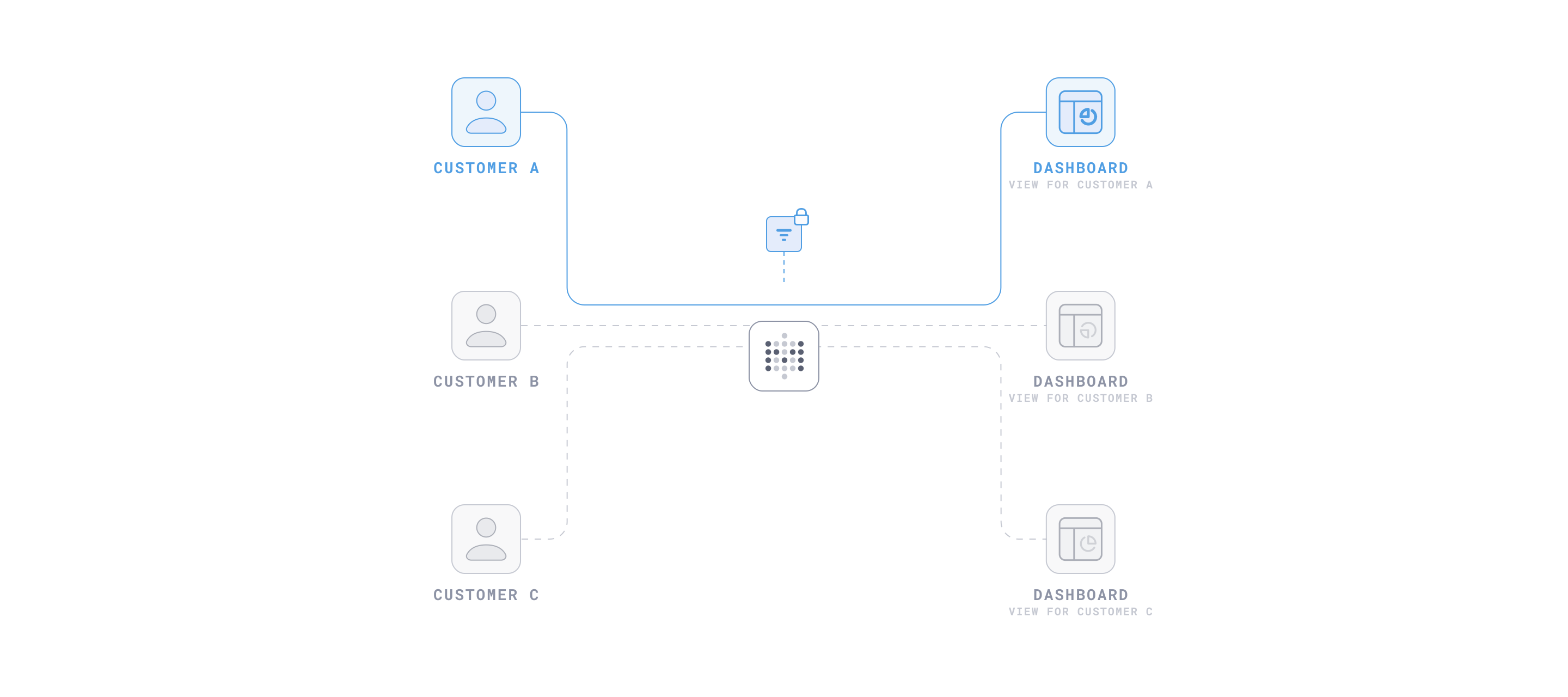
Say you want each customer to see only their own rows. On an embed with guest authentication, nobody’s signed in to your Metabase, so permissions can’t scope rows per person. Instead, you can lock the parameter: your server sets the parameter’s value in the signed token, and Metabase applies the value before running anything. And because the value is set by the token, the viewer won’t be able to change it.
Lock a parameter
- Visit the dashboard or question, click the Share icon, and select Embed.
- Under Parameters, set the parameter to Locked.
- Optional: pick a value under Previewing locked parameters. The wizard writes it into the server code it generates, so you can see the exact format Metabase expects.
- Click Publish.
- On your server, put the value in the
paramsobject when you sign the token:
// Install via 'npm install jsonwebtoken'
import jwt from "jsonwebtoken";

const METABASE_SECRET_KEY = "YOUR_METABASE_SECRET_KEY";

const payload = {
  resource: { dashboard: 10 },
  params: {
    // Keyed by slug. Values are arrays. Set this from your app's session, not from the page.
    customer_id: [13],
  },
  exp: Math.round(Date.now() / 1000) + 10 * 60, // 10 minute expiration
};

const token = jwt.sign(payload, METABASE_SECRET_KEY);
Then pass the token to the component, as the token attribute on <metabase-dashboard> or the token prop on StaticDashboard in the SDK, or have the embed fetch it from your server. The dashboard shows only customer 13’s rows, with no Customer ID widget. On a legacy static embed, the token goes in the iframe URL instead. For fetching and refreshing the token, check out Guest embeds.
Some notes on locked parameters:
- Every token has to include every locked parameter. If you leave out a parameter, Metabase refuses the request. The dashboard still renders its frame and widgets, and each card shows
You must specify a value for :slug in the JWT.in place of its chart. - A locked value narrows the options in editable widgets. Lock State to Vermont, and an editable City filter on the same dashboard only lists Vermont cities (like linked filters).
- Multiple locked parameters combine with AND.
- To turn a locked parameter off for a given token, pass
[]as its value. The token still has to name the parameter; the filter just doesn’t apply. - The key in
paramsis the parameter’s slug. On a dashboard, that’s the dashboard filter’s slug, even when the filter is connected to a SQL variable. If you rename a locked dashboard filter, update the key in your server code to match. On an embedded SQL question, the key is the variable’s name: changing the widget’s label doesn’t affect it, but renaming the variable in the SQL does. - A locked filter only restricts the cards it’s connected to. A dashboard filter with no connected cards still shows up in the wizard, still has to be in the token, but it won’t do anything. The embed renders fine, so nothing in the browser tells you.
- Pass one value to a locked filter that’s connected to a plain SQL variable. Metabase substitutes several values as a comma-separated list, which only works if the query is written for one, like
IN ({{variable}}). To send several values, connect the filter to a field filter instead.
Set starting values
To open an embed with some filters already applied, pass starting values keyed by slug. On a dashboard, people can still change them in the widgets. A SQL question in an SSO embed doesn’t show widgets for its variables, so there the starting values are the values people get.
Without starting values, an SSO embed of a dashboard opens with the values the signed-in person last applied to that dashboard, so two people can see different starting values. Pass starting values, or controlled values, when the embed should open the same way for everyone.
If instead you want your app to be able to push values, or see when people change a widget’s values, use controlled values.
Web component starting values
<metabase-dashboard
  dashboard-id="1"
  initial-parameters='{"state": "NY", "category": ["Gadget", "Gizmo"]}'
></metabase-dashboard>

<metabase-question
  question-id="42"
  initial-sql-parameters='{"product_id": 50}'
></metabase-question>
Changing the attribute after load reloads the embed and discards whatever people had picked.
React SDK starting values
Modular embedding SDK is only available on Pro and Enterprise plans (both self-hosted and on Metabase Cloud).
Dashboards take initialParameters:
<InteractiveDashboard
  dashboardId={dashboardId}
  initialParameters={{ state: "NY" }}
/>
SQL questions take initialSqlParameters:
<StaticQuestion
  questionId={questionId}
  initialSqlParameters={{ product_id: 50 }}
/>
Control values from your app
When your app needs to be the source of truth for filter values, use the parameters attribute on the web component or the parameters prop in the SDK (sql-parameters and sqlParameters for SQL questions). They work like a controlled <input> in React: you hold the values, the embed applies whatever you hand it, and it calls you back whenever someone changes the value in the filter widget. Use controlled values when you want to build your own filter widgets.
Don’t combine controlled values with starting values: if you pass both, the embed uses the controlled values and logs a warning to the console.
Controlled values work with either authentication method. On a guest embed, they apply to parameters you’ve set to Editable in the embed wizard. To restrict data rather than just set a value, lock the parameter instead.
The callback’s payload includes the applied values, each parameter’s default, and a source that says why it fired. For what each parameter type accepts, and how to clear or reset a value, see Value formats by parameter type.
Metabase stores dashboard values as arrays and hands them back that way. Push arrays, like { min_rating: [4] }, if you want the callback’s payload to match what you sent. A bare value works too, but Metabase normalizes it and reports the change with source: "auto-change".
Web component controlled values
Set the value as an attribute. To catch edits people make in Metabase’s widgets, listen for parameters-change on the element:
<metabase-dashboard
  id="my-dashboard"
  dashboard-id="1"
  parameters='{"state": "NY"}'
></metabase-dashboard>

<script>
  const el = document.getElementById("my-dashboard");

  // Fires on load, when someone changes a widget, and when Metabase
  // normalizes a value you pushed. `source` says which.
  el.addEventListener("parameters-change", (event) => {
    const { source, parameters } = event.detail;
    console.log(source, parameters);
  });

  // Push a new value. The embed re-queries without reloading.
  el.parameters = { state: "CA" };
</script>
For a SQL question, use the sql-parameters attribute or sqlParameters property on <metabase-question>, and listen for sql-parameters-change.
To hand control back to the embed, assign null or undefined to the parameters or sqlParameters property. That removes the attribute and returns the element to uncontrolled mode. A dashboard keeps the last applied values. A SQL question reloads with its initial-sql-parameters, or with the variables’ defaults if you haven’t set any.
React SDK controlled values
Modular embedding SDK is only available on Pro and Enterprise plans (both self-hosted and on Metabase Cloud).
Pair parameters with onParametersChange, and keep the values in state:
const [parameters, setParameters] = useState<ParameterValues>({
  state: "NY",
});

const handleParametersChange = (payload: ParameterChangePayload) => {
  // Sync your local state on every applied change. `payload.source` is one of:
  //   "initial-state" — post-load snapshot, fired once per dashboard load
  //   "manual-change" — someone changed a filter widget
  //   "auto-change"   — your push was normalized; re-sync from `payload.parameters`
  setParameters(payload.parameters);
};

return (
  <InteractiveDashboard
    dashboardId={dashboardId}
    parameters={parameters}
    onParametersChange={handleParametersChange}
  />
);
For SQL questions, pair sqlParameters with onSqlParametersChange:
const [sqlParameters, setSqlParameters] = useState<SqlParameterValues>({
  state: "NY",
});

const handleSqlParametersChange = (payload: SqlParameterChangePayload) => {
  // Sync your local state on every applied change. `payload.source` is one of:
  //   "initial-state" — post-load snapshot, fired once per question load
  //   "manual-change" — someone changed a filter widget
  //   "auto-change"   — your push was normalized; re-sync from `payload.parameters`
  setSqlParameters(payload.parameters);
};

return (
  <InteractiveQuestion
    questionId={questionId}
    sqlParameters={sqlParameters}
    onSqlParametersChange={handleSqlParametersChange}
  />
);
You must update your state from the callback. If you don’t, the embed reverts to the values in your prop on the next render (which may wipe out edits people have made).
Hide parameter widgets
On an SSO embed, every dashboard filter shows a widget by default. To hide a filter’s widget without disabling the filter, list its slug in hidden-parameters (web component) or hiddenParameters (SDK).
SQL questions work differently. In an SSO embed, a SQL question doesn’t show widgets for its variables, so there’s nothing to hide: the values come from initial-sql-parameters or sql-parameters, or from the variables’ defaults. On a guest embed, a SQL question shows a widget for each Editable variable, and hidden-parameters hides it. In the SDK, you can add the widgets to an SSO embed yourself with InteractiveQuestion.SqlParametersList in a custom layout, and hiddenParameters applies to that list too.
On a guest embed, only Editable parameters get a widget in the first place, so the embed wizard won’t generate hidden-parameters for you. To remove a widget in a guest embed, set the parameter to Disabled or Locked in the wizard. You can still add hidden-parameters by hand to hide a widget for a parameter you’ve made editable.
Hiding a widget doesn’t restrict anything: the value is still set from the browser, which means that anyone can open the console to change the value. To restrict what people can query, lock the parameter on a guest embed, or use permissions on an SSO embed.
Web component hidden widgets
<metabase-dashboard
  dashboard-id="1"
  initial-parameters='{"state": "NY"}'
  hidden-parameters='["state"]'
></metabase-dashboard>
React SDK hidden widgets
Modular embedding SDK is only available on Pro and Enterprise plans (both self-hosted and on Metabase Cloud).
<InteractiveDashboard
  dashboardId={dashboardId}
  initialParameters={{ state: "NY" }}
  hiddenParameters={["state"]}
/>
The same prop works on StaticQuestion and InteractiveQuestion, wherever a SQL question shows variable widgets: on a guest embed, or in a custom layout that includes SqlParametersList.
Build your own filter UI
If Metabase’s widgets don’t fit your app, you can hide them and make your own. How you push values to the charts depends on what the parameter is for. If your widget just sets a value that anyone could set, control the value from the page. That works on SSO embeds and on guest embeds where the parameter is Editable.
Control editable parameters from your own widgets
Hold the values in your app with the controlled props, hide Metabase’s widgets, and the embed re-queries whenever your widget changes the value. On a guest embed, the parameter has to be Editable in the embed wizard.
Web component custom filter UI
Push your widget’s value with the parameters property, and hide Metabase’s widget with hidden-parameters:
<select id="state-picker">
  <option value="NY">New York</option>
  <option value="CA">California</option>
</select>

<metabase-dashboard
  id="my-dashboard"
  dashboard-id="1"
  parameters='{"state": "NY"}'
  hidden-parameters='["state"]'
></metabase-dashboard>

<script>
  const el = document.getElementById("my-dashboard");

  document
    .getElementById("state-picker")
    .addEventListener("change", (event) => {
      // Your widget owns the value. The embed re-queries without reloading.
      el.parameters = { state: event.target.value };
    });
</script>
React SDK custom filter UI
Pass your widget’s value in parameters, and hide Metabase’s widget with hiddenParameters:
// Your widget owns the value. Metabase's State widget stays hidden.
const [state, setState] = useState("NY");

return (
  <>
    <select value={state} onChange={(event) => setState(event.target.value)}>
      <option value="NY">New York</option>
      <option value="CA">California</option>
    </select>

    <InteractiveDashboard
      dashboardId={dashboardId}
      parameters={{ state }}
      hiddenParameters={["state"]}
    />
  </>
);
If you’d rather use Metabase’s own widgets for a SQL question’s variables, the SDK’s InteractiveQuestion.SqlParametersList renders them wherever you put them in a custom layout. That’s also the only way to get variable widgets on a SQL question in an SSO embed, since the default layout leaves them out.
Change a locked value from your page
Sometimes one viewer is allowed more than one value, but not every value. Say an account manager covers three customers. The Customer ID parameter has to stay locked so the manager can’t query a fourth customer, but they still need to switch between their three. A widget on your page picks the customer, your server signs a new token with that value in params, and you hand the token to the component. The embed re-queries with the new locked value.
Because the parameter is locked, your server should check that the viewer is allowed the value before it signs the new token. If the endpoint signs whatever value it’s sent, anyone can request a token for any value, and the parameter is no safer than an editable parameter that you’ve hidden.
Web component re-signed token
<!-- Render this token on your server for each page load. Don't let
     guestEmbedProviderUri fetch the first one; see below. -->
<metabase-dashboard
  id="my-dashboard"
  token="INITIAL_SIGNED_TOKEN"
></metabase-dashboard>

<script>
  async function onCustomerChange(customerId) {
    // Your endpoint checks that this viewer may see `customerId`,
    // then signs a token with params: { customer_id: [customerId] }
    const response = await fetch(
      `/api/metabase-token?customer_id=${encodeURIComponent(customerId)}`,
    );
    const { jwt } = await response.json();
    document.getElementById("my-dashboard").setAttribute("token", jwt);
  }
</script>
Render the first token into the token attribute yourself rather than letting guestEmbedProviderUri fetch it. An embed that starts without a token fetches one on load, and that token would overwrite the value your widget just set.
There are two endpoints in play, and only one of them gets the value your widget picked. The /api/metabase-token endpoint in the example is yours: it signs a token for a value your page passes. The guestEmbedProviderUri endpoint, if you’ve set one, signs the token the embed fetches on its own: on load when there’s no token attribute, and after the current token expires.
Once the token expires, the embed asks the provider endpoint for a fresh one the next time it needs data, like when someone changes a filter. That request carries only the resource id and the custom-context attribute, not the value your widget picked. So unless the endpoint can work the value out on its own, from custom-context or from your app’s session, the locked value snaps back to whatever the endpoint signs by default. Check out Sending custom context for the shape the provider endpoint receives.
React SDK re-signed token
Hold the token in state, pass it to the token prop on StaticDashboard, and set key={token} so the component remounts when the token changes. Without the key, the new token is stored but the dashboard doesn’t re-query. Guest token refresh with guestEmbedProviderUri isn’t supported in the SDK, so the caveats in the web component section don’t apply: your app is the only thing that sets the token, including when it expires. Guest embeds in the SDK need isGuest: true in the MetabaseProvider auth config, and a page can use only one authentication method. Check out Using guest embeds with the SDK.
// Render the first token yourself, for example from your server-rendered page props.
const [token, setToken] = useState(INITIAL_SIGNED_TOKEN);

async function onCustomerChange(customerId: string) {
  // Your endpoint checks that this viewer may see `customerId`,
  // then signs a token with params: { customer_id: [customerId] }
  const response = await fetch(
    `/api/metabase-token?customer_id=${encodeURIComponent(customerId)}`,
  );
  const { jwt } = await response.json();
  setToken(jwt);
}

return (
  <>
    <select onChange={(event) => onCustomerChange(event.target.value)}>
      <option value="13">Customer 13</option>
      <option value="14">Customer 14</option>
      <option value="15">Customer 15</option>
    </select>

    {/* `key` remounts the dashboard when the token changes, so it re-queries with the new locked value. */}
    <StaticDashboard key={token} token={token} />
  </>
);
Parameters in iframe embeds
Everything above applies to modular embeds. The iframe-based embeds set parameters through the URL instead:
- Public links and public embeds: add
?slug=valueto set a filter, and#hide_parameters=slugto hide its widget. Anyone can edit the URL, so these don’t restrict data. - Static embeds (deprecated): same token and rules as guest embeds. Set a parameter to Locked and pass its value in
params. Editable parameters get a widget in the iframe, and take starting values from the URL with the same syntax as public embeds. Hide a widget with#hide_parameters=slug, and set appearance with the same hash parameters as public embeds. - Full app embedding: filter values go in the Metabase URL you load in the iframe, the same way as in Metabase itself.
Further reading
Read docs for other versions of Metabase.