


Guest embeds
Guest embeds are a way to embed basic Metabase components in your app without requiring you to create a Metabase account for each person viewing the charts and dashboards. But not logging people in to your Metabase has some major tradeoffs: see limitations.
Looking for static embedding? It’s deprecated in favor of guest embeds.
“Guest” refers to the authentication approach: Metabase doesn’t create a session for each person. Authentication has nothing to do with data freshness. Dashboards and charts in guest embeds always show live data from your database.
Even though you’re not using SSO, guest embeds are still secure: Metabase will only load the embed if the request has a JWT signed with the secret shared between your app and your Metabase. The JWT also includes a reference to the resource to load (like the ID of the embedded item), and any values for parameters.
To restrict data in guest embeds for specific people or groups, use locked parameters.
Turning on guest embedding in Metabase
The path to embedding settings depends on your Metabase version:
- OSS: Admin > Embedding
- Starter/Pro/Enterprise: Admin > Embedding > Guest embeds
Toggle Enable guest embeds.
Creating a guest embed
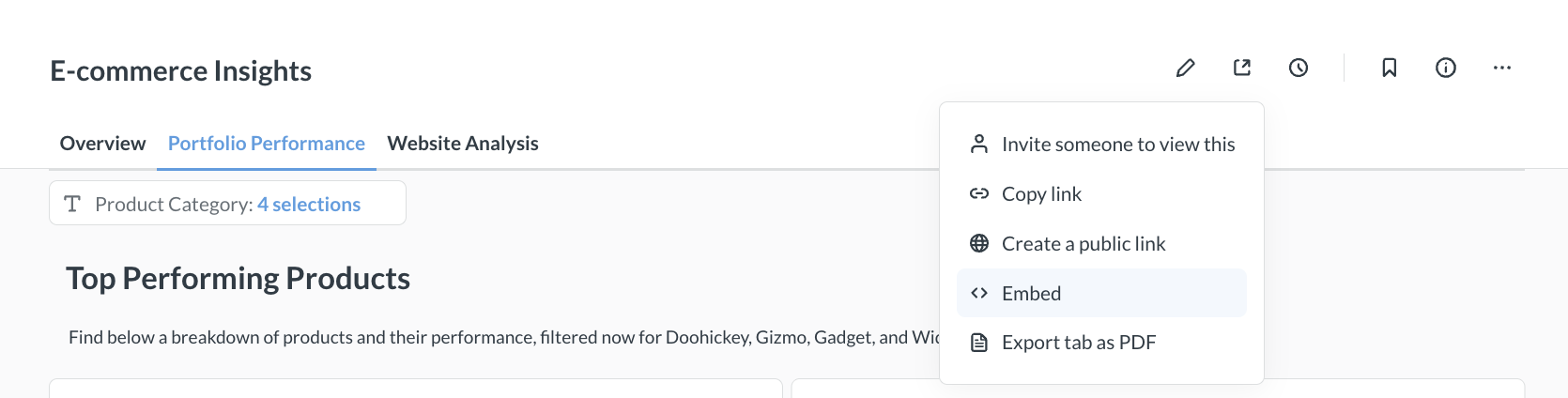
To create a guest embed:
- Go to the item that you want to embed in your website. You can also open a command palette with Ctrl/Cmd+K and type “New embed”.
- Click the Share icon.
- Select Embed.
- Under Authentication, select Guest.
- Optional: customize the appearance of the embed
- Optional: set the visibility of each parameter.
- Click Publish.
- Get the code snippet that the wizard generates and add it to your app.
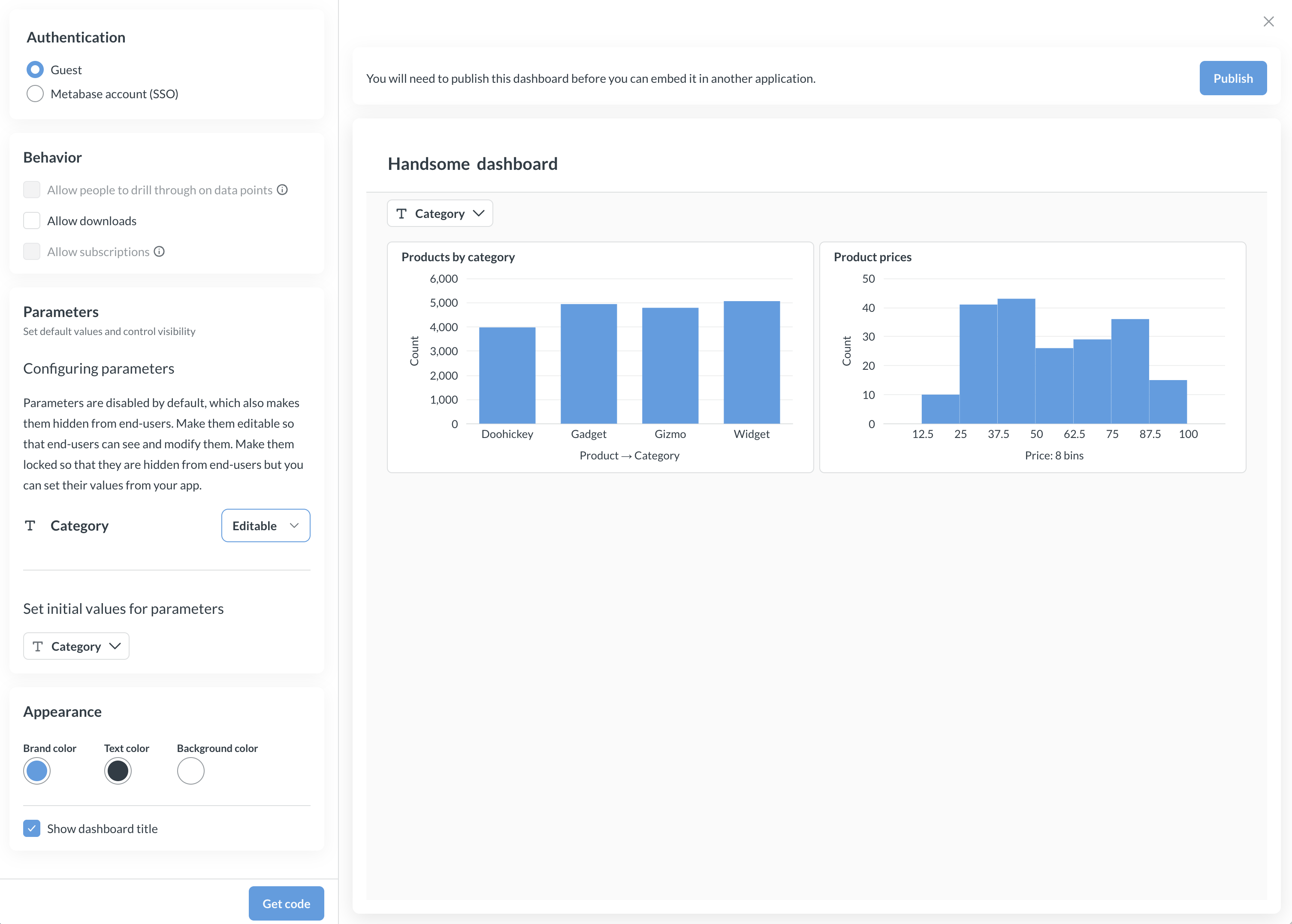
Notes on the code the wizard generates
You can edit the code (see the question component reference, the dashboard component reference, and appearance). But here’s an overview of the code the wizard generates, and where to put it.
Client-side code
Add the embed script and configuration to your HTML:
<script defer src="YOUR_METABASE_URL/app/embed.js"></script>
<script>
  window.metabaseConfig = {
    isGuest: true,
    instanceUrl: "YOUR_METABASE_URL",
    // Optional. Set this if you want the embed to fetch a fresh JWT
    // when the current one expires. See "Refreshing the JWT" below.
    // guestEmbedProviderUri: "/your/apps/endpoint",
  };
</script>
Then add the component for the item you want to embed:
<!-- For dashboards -->
<metabase-dashboard
  token="YOUR_JWT_TOKEN"
  with-title="true"
  with-downloads="false"
  initial-parameters='{"category":["Gizmo"]}'
></metabase-dashboard>

<!-- For questions -->
<metabase-question token="YOUR_JWT_TOKEN"></metabase-question>
Don’t paste a fixed JWT into your HTML and leave it there. Tokens expire, so that embed will stop working. Either sign a fresh token on your server for each page load and render it into the
tokenattribute, or setguestEmbedProviderUriand let the embed fetch and refresh its own token.
Server-side code
Your server generates signed JWT tokens that authenticate the embed request. Here’s an example using Node.js:
const jwt = require("jsonwebtoken");

const METABASE_SECRET_KEY = "YOUR_METABASE_SECRET_KEY";

const payload = {
  resource: { dashboard: 10 }, // or { question: 5 } for questions
  params: {},
  exp: Math.round(Date.now() / 1000) + 10 * 60, // 10 minute expiration
};

const token = jwt.sign(payload, METABASE_SECRET_KEY);
Replace YOUR_METABASE_SECRET_KEY with your embedding secret key. These examples use sequential IDs — the number in the item’s URL. On Pro and Enterprise plans, you can use entity IDs instead; they stay the same when you serialize content from one Metabase to another, like from staging to production. To use an entity ID, replace the sequential ID in the resource map with the item’s entity ID, like resource: { dashboard: "YOUR_ENTITY_ID" }. If you don’t serialize your Metabase, either ID works.
Component attributes
You can set different attributes to enable/disable UI. Here are some example attributes:
| Attribute | Description |
|---|---|
token |
Required. The signed JWT token from your server. |
with-title |
Show or hide the title. Values: "true" or "false". |
with-downloads* |
Enable or disable downloads. Values: "true" or "false". |
initial-parameters |
JSON string of starting parameter values (uncontrolled). Example: '{"category":["Gizmo"]}'. See Embedding parameters. |
parameters |
JSON string of parameter values (controlled). Example: '{"category":["Gizmo"]}'. See Embedding parameters. |
hidden-parameters |
JSON array of slugs whose widgets to hide. Only Editable parameters have a widget on a guest embed, so the wizard won’t generate this for you. Hiding a widget doesn’t restrict the value. See Hide parameter widgets. |
auto-refresh-interval |
Dashboards only. Auto-refresh interval in seconds. |
custom-context |
Forwarded to your guestEmbedProviderUri endpoint as customContext. Either a string (e.g., "gadgets-tab"), or a JSON-stringified object like initial-parameters (e.g., '{"tab":"gadgets","region":"us-east"}'). |
* Disabling downloads is only available on Pro and Enterprise plans.
Attributes will differ based on the type of thing you’re embedding. Guest embeds have fewer options than embeds that use SSO. For every attribute, see the dashboard component reference and the question component reference.
Customizing appearance of guest embeds
Appearance settings available for guest embeds depend on your Metabase plan. If you’re running Metabase OSS/Starter, you can select light or dark theme. If you’re running Metabase Pro/Enterprise, you’ll have access to granular customization options, see Appearance.
Configuring parameters
Parameters on a guest embed start out Disabled: the widget is hidden, and nobody can set the value. When you publish the embed, you can make each one Editable (people see the widget and can change the value, and your page can set a starting value) or Locked (your server sets the value in the JWT, and nobody sees the widget). Check out Parameters differ between guest and SSO embeds.
Locked parameters
Locked parameters are how you restrict data in a guest embed. Your server puts the value in the params object of the token it signs, and Metabase applies the filter before anything reaches the browser.
- For the walkthrough, check out Restrict data on guest embeds.
- For the rules Metabase applies to
params, check out Params in a signed token. - To control a locked parameter from a widget you build yourself, check out Change a locked value from your page.
Refreshing or initializing the JWT from your server
JWTs that you sign for guest embeds have an expiration (exp). Once a token expires, the embed can’t load fresh data. Swapping in a new token from your page reloads the embed. That resets any selections the viewer made in Metabase’s widgets. Values your page holds in the parameters attribute are applied again. To keep the embed alive without reloading the page, you can configure a guest token endpoint on your server to hand out fresh JWTs on demand.
The endpoint can serve two flows:
- Refreshing tokens: when the embed’s current JWT is about to expire, the embed POSTs to your endpoint to get the new JWT, and swaps it in.
- Initializing with a token (optional): if you don’t want to pre-render a JWT in the HTML at all, the embed can call the same endpoint on load to fetch that first JWT.
Setting the endpoint URL in the guest embed
Add guestEmbedProviderUri to your metabaseConfig. The value is a path (or full URL) to an endpoint in your app:
<script>
  window.metabaseConfig = {
    isGuest: true,
    instanceUrl: "YOUR_METABASE_URL",
    guestEmbedProviderUri: "/api/metabase-guest-token",
  };
</script>
When the embed needs a token, it sends a POST request to guestEmbedProviderUri with a JSON body, which includes cookies, so you can authenticate the request with your app’s existing session.
Request:
{
  "entityType": "dashboard",
  "entityId": 10,
  "customContext": "..."
}
| Field | Description |
|---|---|
entityType |
"dashboard" or "question". |
entityId |
The ID of the dashboard or question being embedded, as you set it on the component. |
customContext |
Optional. The string or object you set on the custom-context attribute. |
Response: a JSON object with a single jwt field:
{ "jwt": "YOUR_NEWLY_SIGNED_JWT" }
Refresh flow
Pre-render an initial JWT on the component (just like a regular guest embed) and configure guestEmbedProviderUri. When the JWT expires, the embed will call your endpoint to get a fresh one and swap it in.
<script>
  window.metabaseConfig = {
    isGuest: true,
    instanceUrl: "YOUR_METABASE_URL",
    guestEmbedProviderUri: "/api/metabase-guest-token",
  };
</script>

<metabase-dashboard token="YOUR_INITIAL_JWT"></metabase-dashboard>
Initialize the embed without a JWT in the HTML
If you don’t want to render the JWT in the HTML at all, omit the token attribute and use dashboard-id (or question-id) instead. If you’ve set the guestEmbedProviderUri, then the embed will call that endpoint on load to fetch the first JWT.
<metabase-dashboard dashboard-id="10"></metabase-dashboard>
This way you can keep all your token-issuing logic in one place on your server.
Example endpoint (Node.js / Express)
const jwt = require("jsonwebtoken");
const METABASE_SECRET_KEY = "YOUR_METABASE_SECRET_KEY";

app.post("/api/metabase-guest-token", (req, res) => {
  // Authenticate using your app's existing session.
  const user = req.session?.user;
  if (!user) {
    return res.status(403).json({ error: "Not signed in" });
  }

  const { entityType, entityId, customContext } = req.body;

  // Authorize the request. The browser picks the entityType and entityId, so
  // check them against your own rule before signing for them.
  // This is just an example
  if (!userCanView(user, entityType, entityId)) {
    return res.status(403).json({ error: "Not allowed" });
  }

  const payload = {
    resource: { [entityType]: entityId },
    params: paramsFor(user, customContext),
    exp: Math.round(Date.now() / 1000) + 10 * 60, // 10 minute expiration
  };

  res.json({ jwt: jwt.sign(payload, METABASE_SECRET_KEY) });
});
Because the embed’s request includes your app’s session cookie, your endpoint can:
- Refuse to issue a JWT (with a
403) for visitors who aren’t signed in to your app. - Refuse to issue a JWT for a dashboard or question that this visitor shouldn’t see. The
entityTypeandentityIdarrive from the browser, so an endpoint that signs them unchecked will give any signed-in visitor a token for any published item. - Compute different
params(i.e., locked filter values) per visitor.
Sending custom context
When you embed the same dashboard or question more than once on a page, you can use the custom-context attribute to tell your endpoint which copy is requesting a token. The value you pass is forwarded to your endpoint as customContext.
For example, two copies of the same dashboard scoped to different categories:
<metabase-dashboard
  dashboard-id="10"
  custom-context="gadgets-tab"
></metabase-dashboard>
You can also pass a JSON-stringified object (the embed parses it before forwarding it on, so your endpoint receives a real object):
<metabase-dashboard
  dashboard-id="10"
  custom-context='{"tab":"gadgets","region":"us-east"}'
></metabase-dashboard>
Your endpoint can switch on customContext to set different locked parameters, like so:
function paramsFor(user, customContext) {
  switch (customContext) {
    case "gadgets-tab":
      return { category: ["Gadget"] };
    case "doohickeys-tab":
      return { category: ["Doohickey"] };
    default:
      return {};
  }
}
Editing a published embed
If you change an embed’s settings in the wizard, like a parameter’s visibility or its appearance:
- Click Publish again.
- Copy the code Metabase regenerates.
- Update your server and page code to match. If you locked a parameter, every token you sign now has to include a value for it.
Disabling embedding for a question or dashboard
- Visit the embeddable question or dashboard.
- Click the Share icon (square with an arrow pointing to the top right).
- Select Embed.
- Select Guest embedding
- Click Unpublish.
Admins can find a list of embedded items in Admin > Embedding (on Pro and Enterprise plans, check the Guest embeds tab).
Removing the “Powered by Metabase” banner

Metabase adds the banner to guest embeds (both charts and dashboards) on the OSS and Starter plans. To remove the banner, upgrade to a Pro or Enterprise plan.
Regenerating the embedding secret key
Your embedding secret key is used to sign JWTs for all of your embeds.
- Go to Admin > Embedding. On Pro and Enterprise plans, check the Guest embeds tab.
- Under Regenerate secret key, click Regenerate key.
This key is shared across all guest embeds. Whoever has access to this key could get access to all embedded artifacts, so keep this key secure. If you regenerate this key, you’ll need to update your server code with the new key.
Custom destinations on dashboards in guest embeds
You can only use the URL option for custom destinations on dashboards with guest embedding. External URLs will open in a new tab or window.
You can propagate filter values into the external URL, unless the filter is locked.
Translating embeds
To translate an embed, set the locale in window.metabaseConfig:
<script>
  window.metabaseConfig = {
    isGuest: true,
    instanceUrl: "YOUR_METABASE_URL",
    locale: "es",
  };
</script>
The locale setting works for all modular embeds (guest, SSO, and SDK). Metabase will automatically translate UI elements (like menus and buttons). To also translate content like dashboard titles and filter labels, you’ll need to upload a translation dictionary.
How guest embedding works
Guest embeds use web components (<metabase-dashboard> and <metabase-question>) that communicate with your Metabase instance. Each embed request requires a JWT token signed with your secret key.
When a visitor views your page:
- Your server generates a signed JWT token containing the resource ID (dashboard or question) and any locked parameters.
- The web component sends the token to Metabase.
- Metabase verifies the JWT signature using your secret key.
- If valid, Metabase returns the embedded content.
- If you’ve configured JWT refresh, the embed will fetch a fresh JWT from your endpoint when it next needs to make a data request after the current token has expired — not on a background timer. An idle embed makes no refresh requests. (Optionally, the embed can also fetch the very first JWT from your endpoint on load.) The embed keeps working without a page reload.
For interactive filters, you can pass initial parameter values via the initial-parameters attribute. When a visitor changes a filter, the web component handles the update automatically.
The signed JWT is generated using your Metabase secret key. The secret key tells Metabase that the request can be trusted. Note that this secret key is shared for all guest embeds, so whoever has access to that key will have access to all embedded artifacts.
If you want to embed charts with additional interactive features, like drill-down and self-service querying, see Modular embedding.
Using guest embeds with the SDK
If you’re using the Modular Embedding SDK, and you also want to embed a question or dashboard using guest authentication, you’ll still need to visit the item in your Metabase and publish the item. You can ignore the code the wizard generates, but in order for Metabase to know it’s okay to serve the item, you need to publish it.
One limitation, however, is that you can only have one type of authentication per page of your app. For example, on a single page in your app, you can’t have both one question using guest authentication and another question using SSO.
Guest embed limitations
Because guest embeds don’t require you to create a Metabase account for each person via SSO, Metabase can’t know who is viewing the embed, and therefore can’t give them access to all their data and all the cool stuff Metabase can do.
Guest embeds can’t take advantage of:
- Row and column security
- Database routing
- Drill-through
- Usage analytics
- Query builder
- AI chat
- Custom visualizations
For those features, check out Modular embedding with SSO.
Further reading
Read docs for other versions of Metabase.